How to register your Ejari online in Dubai
If you’re planning to rent a place in Dubai, you’ll definitely come across the term Ejari. Without it, you can't activate DEWA, apply for a family visa, or legally renew your lease. While the process might sound complicated at first, most tenants can now complete their Ejari registration fully online in just a few minutes.
"In our experience managing thousands of residential units across Dubai, the most common delay we see is tenants submitting documents before the landlord has set up their UAE Pass. Getting that one step right cuts the registration time from days to minutes."
— betterhomes
This guide walks you through exactly what Ejari is, how to register it online, and what to watch out for to avoid time-wasting mistakes.
What is Ejari in Dubai?
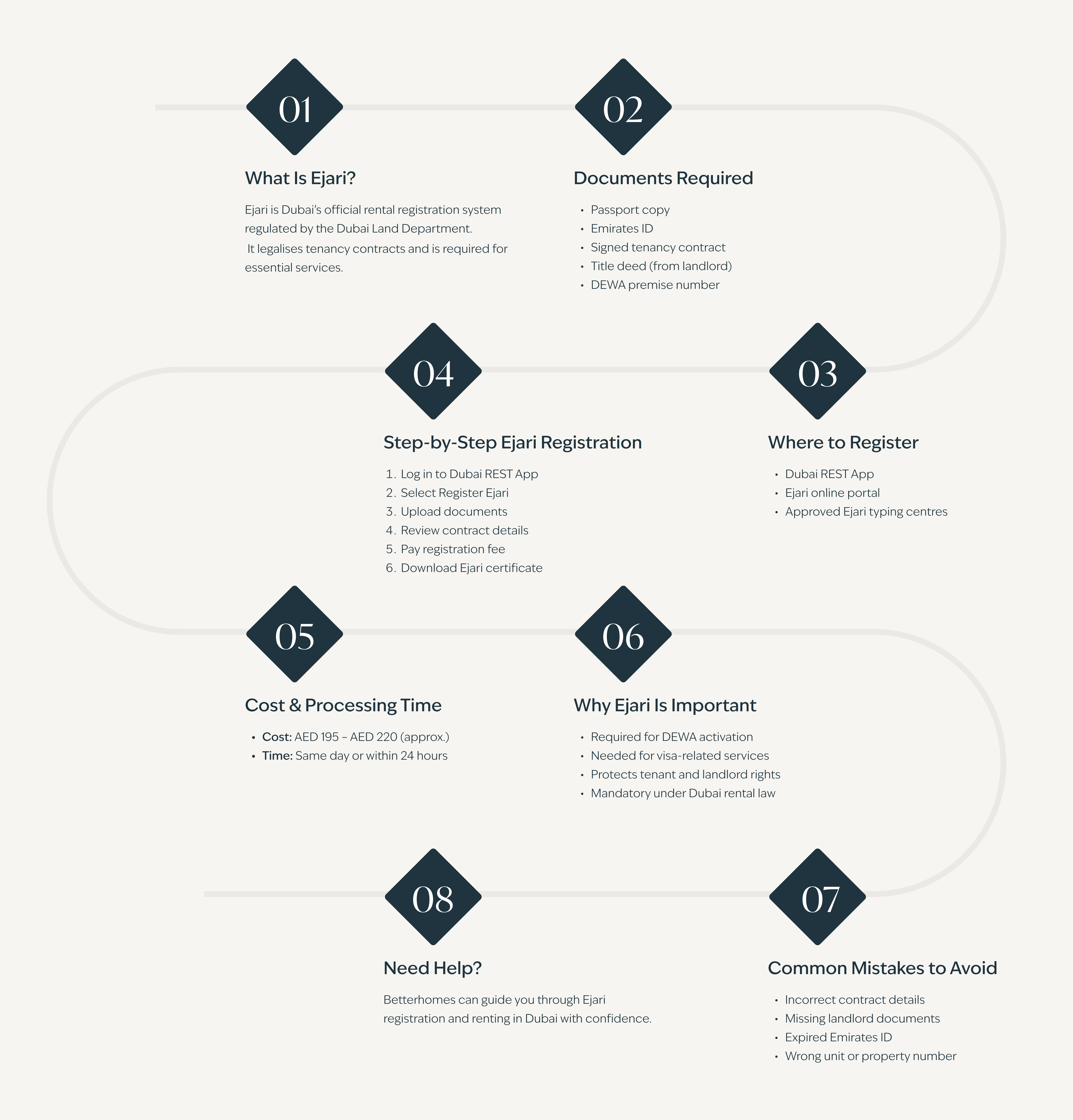
Ejari (إيجاري) means “My Rent” in Arabic. It is an online registration system run by the Dubai Land Department (DLD) that provides an official record of every rental contract in the government system. Once your contract is registered, you receive an Ejari certificate confirming that the tenancy has been officially recognised by the Dubai authorities.
Ejari registration is mandatory for properties for rent in Dubai and is commonly required for:
- DEWA activation
- Visa applications and renewals
- Internet and telecom setup
- Rental dispute resolution
- Official proof of address
- Tenancy renewals
Regardless of the property type (apartment, villa, or office), Ejari registration is mandatory for all residential rental contracts in Dubai.
What documents are required for Ejari registration?
To register your Ejari, you will require the following documents:
- A clear PDF/scan of the unified contract signed by both parties
- Tenant’s UAE Pass (replaces manual ID/Visa uploads)
- Landlord’s registered mobile number (they must log in to Dubai REST to "Approve" your request before it’s finalised)
- 9-digit DEWA Premises Number
- The Power of Attorney number (if a representative is filing)
- Important: If the landlord does not have a UAE Pass account, the online system cannot process the request. In that case, a visit to an Al Taresh centre or DLD-approved Trustee Centre will be necessary.
How much does Ejari cost and how long does it take?
When you register Ejari online through the Dubai REST app or online portal, you’ll need to pay a few standard fees set by the authorities.
Online registration incurs no additional charges beyond this. When documents are in order, the certificate is issued the same day, often within minutes of payment.
How to register Ejari online in Dubai?
Dubai currently offers two official digital channels for online Ejari registration:
Option 1: Register using the Dubai REST app
The Dubai REST app is designed for people who want a quick and fully digital process. Registration can be completed directly from a mobile phone without visiting any office.
Step 1: Log in to the app using UAE Pass to sync your profile and Emirates ID automatically
Step 2: Open the Services tab, select RERA, and choose the Register or Renew Ejari option
Step 3: Link the property by scanning the QR code on the Title Deed or entering the DEWA Premises Number
Step 4: Enter lease dates, total rent amount, and cheque details as stated in the signed contract
Step 5: Upload clear photos or PDF copies of the unified tenancy contract and security deposit receipt
Step 6: Submit the application to notify the landlord through the Dubai REST app
Step 7: Wait for the landlord to review details and approve the request digitally
Step 8: Pay the fee after approval using Apple Pay, Google Pay, or a credit card
Step 9: Download the Ejari certificate once payment is confirmed
Option 2: Register via the DLD Ejari online portal
The Ejari online portal follows a structured flow that helps tenants get Ejari online on a desktop or laptop.
Step 1: Log in to the portal using UAE Pass, as manual registration is no longer standard for individual users.
Step 2: Open the Services section and choose Register or Renew Tenancy Contract under Ejari.
Step 3: Enter the 9-digit DEWA Premises Number to automatically populate the property address and plot details.
Step 4: Fill in the contract information, such as lease start and end dates, annual rent, and cheque count.
Step 5: Upload clear digital copies of the signed unified tenancy contract, the tenant's Emirates ID, and the tenant's passport.
Step 6: Complete the payment.
Step 7: Wait for landlord approval. The landlord must confirm the request digitally through their DLD account or the Dubai REST app.
Step 8: Download the Ejari certificate once approval is granted, as it is generated instantly as a PDF.
Step 9: An automatic DEWA activation link is sent to the registered email address.
betterhomes real estate blogs are useful for tenants trying to understand rental processes in Dubai, such as Ejari registration, DEWA setup, tenancy renewals, and rental regulations before moving into a new home.
Can Ejari be registered offline?

Yes, tenants can register Ejari through DLD-approved Trustee Centres or typing centres across Dubai.
Offline registration is commonly used when:
- The landlord does not have a UAE Pass
- Tenancy documents require manual verification
- Someone is applying on behalf of the owner or tenant
- Technical issues prevent online approval
Applicants must carry the required tenancy documents, Emirates ID, and supporting property details during the visit.
Offline Ejari registration through Trustee Centres costs AED 220 in total, which includes:
AED 100 registration fee
AED 10 knowledge fee
AED 10 innovation fee
AED 95 service partner fee + VAT
The final amount may vary slightly depending on the Trustee Centre or typing centre handling the application. In most cases, the Ejari certificate is issued on the same day that the documents are successfully verified.
How to check Ejari status online?
Tenants can check their Ejari status online through the Dubai REST app, the Dubai Land Department (DLD) website, or UAE PASS. The system allows users to view active tenancy contracts, confirm registration status, and download the Ejari certificate digitally.
Step 1: Log In Using UAE Pass
Open the Dubai REST app or the DLD portal and sign in using your UAE Pass account.
Step 2: Open the Tenancy or Property Section
Go to the Property Wallet, Certificates section, or tenancy services area, depending on the platform you’re using.
Step 3: Enter the Required Details
You may need:
- Ejari contract number
- DEWA Premises Number
- Dubai Municipality number
These details are available on the tenancy contract or the previous Ejari certificate.
Step 4: View the Ejari Status
The system will display:
- Active or expired tenancy contracts
- Ejari registration status
- Certificate details
- Registration history
Step 5: Download the Ejari Certificate
If the registration has already been approved, the Ejari certificate can be downloaded instantly as a PDF through the platform.
Tenants can also track pending requests through the “My Requests” section on Dubai REST, which shows whether landlord approval or document review is still pending.
How to renew Ejari online?
Ejari must be renewed every time a tenancy contract is renewed for a new term. The online system enables quick renewals without having to redo the entire registration process.
Step 1: Log in using UAE Pass and select the Renew Ejari service
Step 2: Choose the active contract and update lease dates or rent if required
Step 3: Upload the renewed tenancy contract and the latest DEWA bill
Step 4: Pay the AED 177.75 fee through the app
Step 5: Get landlord approval digitally
Step 6: Download the renewed Ejari certificate
Once the landlord approves the renewal, the updated Ejari certificate is issued immediately and saved to your digital wallet. The system also automatically updates DEWA, so electricity and water services continue without disruption.
How to cancel Ejari?
When a tenancy ends, the Ejari record must be closed to confirm that the property is no longer under an active lease. Here's how to do it:
Step 1: Log in using UAE Pass on the Dubai REST app or DLD portal
Step 2: Select the active Ejari contract from the Property Wallet
Step 3: Upload the final DEWA bill with zero balance
Step 4: Add a signed cancellation letter or landlord NOC
Step 5: Choose the cancellation reason and submit the request
There is no processing fee for Ejari cancellation in Dubai. Once a DLD officer approves the request, the property status is updated to "Vacant" within a few working hours.
Common Ejari mistakes that can delay approval

Online Ejari registration may seem simple, but small mistakes can slow the process. Most delays arise from details that are easy to miss during submission. Keeping an eye on the following points can save time and frustration.
- Contract details that do not fully match the signed tenancy agreement
- Landlord documents not uploaded or uploaded in the wrong format
- Emirates ID submitted after expiry or close to its expiration date
- Unit number or property details entered incorrectly in the system
A quick review of documents and details can help avoid rejections and keep the Ejari process moving without unnecessary back-and-forth.
As a top real estate agency in Dubai, betterhomes has managed over 8,500 residential units. Based on portfolio data, tenants who complete Ejari registration within the first 48 hours of signing a contract experience significantly fewer delays in DEWA activation and visa processing than those who delay it.
Final Thoughts
Ejari is often treated as a formality during the move-in process, but delaying it can quickly create issues later. Without an active Ejari certificate, even routine tasks like activating utilities or updating tenancy records can get held up unexpectedly. The online system has made registration much easier than before, especially for tenants who handle everything remotely or are moving to Dubai for the first time. Most applications move quickly when the tenancy contract details are accurate, documents are uploaded clearly, and landlord approvals are completed early in the process. For tenants managing multiple deadlines during a move, completing the Ejari early avoids unnecessary follow-ups, delays, and last-minute paperwork.
Not sure if documents are ready or whether the submission will go through smoothly? The property management services at betterhomes help tenants and landlords handle Ejari registration more efficiently, from document checks to submission support and follow-ups.
Frequently Asked Questions
Who is responsible for Ejari registration in Dubai?
+−
In most cases, the tenant handles Ejari registration. Some landlords handle it themselves, but responsibility should always be confirmed before submission.
How long does online Ejari registration take?
+−
When documents are uploaded correctly, registration is completed within minutes. The Ejari certificate is usually issued the same day.
Does Ejari need to be renewed when a tenancy contract is renewed?
+−
Ejari renewal is required whenever you renew your tenancy contract for your rental property in Dubai. You can submit all the necessary Ejari renewal documents online.
Is Ejari mandatory for renting in Dubai?
+−
Yes, Ejari registration is required for all residential rental contracts in Dubai and is linked to essential services and official records.
What documents are needed for Ejari registration?
+−
The required documents are the unified tenancy contract (signed by both parties), the tenant's UAE Pass, the landlord's registered mobile number, and the 9-digit DEWA Premises Number. A Power of Attorney number is only needed when a representative is filing on behalf of the tenant.
How much does Ejari registration cost?
+−
The total cost for online Ejari registration is AED 177.75, which includes the AED 100 registration fee, AED 10 knowledge fee, AED 10 innovation fee, and a service partner fee of AED 55 plus VAT.
Can Ejari be registered online?
+−
Yes. Ejari can be registered fully online through the Dubai REST app (recommended for mobile) or the DLD Ejari online portal (better suited for desktop). No office visit is required, as long as the landlord has a UAE Pass account to approve the request digitally.
What is the difference between Ejari and a tenancy contract?
+−
A tenancy contract is a private agreement between a landlord and tenant outlining rent, dates, and conditions. Ejari is the official government registration of that contract with the Dubai Land Department. Without Ejari, the contract exists but has no legal standing in the government system and cannot be used to access utilities, visas, or other official services.
Can Ejari be renewed online?
+−
Yes. Ejari renewal can be completed entirely online through the Dubai REST app or DLD portal using UAE Pass. The renewed tenancy contract, the latest DEWA bill, and landlord digital approval are all required. The renewal fee is AED 177.75, and the updated certificate is issued immediately upon approval.
What happens if Ejari details are entered incorrectly?
+−
Incorrect details can lead to rejection or delays. The application may need to be resubmitted after corrections, which will add additional time.